
Months of frames in. A two-minute video out.
Point a camera at something slow — a build, a renovation, a season — and Tweedia turns what it captured into a short video worth watching. It cuts the hours where nothing happens, steadies the flicker, and keeps your footage filed by capture day. All in the browser.
Already have an account?
Start free. No credit card required. No plugins, no camera subscription.
By signing up, you agree to our Terms of Service and Privacy Policy.
One day on a deck build, three ways. Straight off the camera it's 0:29. MotionTrim cuts the quiet down to the 0:12 that matters. MotionPace reaches the same 0:12 without dropping a moment — slow where the work happens, fast where nothing does.
New — MotionPace
The timelapse that paces itself
Constant speed gives every hour the same glance. MotionPace reads the motion in your shoot and spends the runtime where the action is — slowing into the busy stretches, sprinting past the quiet ones. Same length, twice the story.
Every card is a frame that made the final cut, dropped at the minute it was shot. Where the crew is working they pile up. Where the site is empty they spread apart. Same frames — speed follows the motion.
What you can bring
Photo sequencesInterval shooters
Drop a card full of stills — hundreds or thousands at a time. Tweedia reads the capture date off each one, files it under the right day, and compiles the whole thing into video for you. No renaming, no folder wrangling.
Long videoSet-and-forget cams
Upload the long clips a GoPro, phone, or jobsite camera produces and skip the compile step entirely. Tweedia analyzes the footage you already have and goes straight to cutting it down.
Works with the camera you already own — GoPro, iPhone and Android, DSLR and mirrorless, jobsite cameras, Raspberry Pi rigs. Nothing to install.
How it works
From camera to final cut in three steps
No timeline scrubbing, no plugin stack, no render farm.
- 1
Bring what you shot
Upload photos or video straight off the card. Every frame lands on the day it was captured, so a long shoot arrives organized instead of as one pile.
- 2
Tune the edit
Switch each step on or off and watch the timeline respond as you drag. Tuning and previewing are free — credits are only spent when you render.
- 3
Render and share
Tweedia builds the finished video in the cloud. Download it and post it anywhere — no desktop editor involved.
What it actually does
Three problems that make long shoots unwatchable
Tweedia fixes each one, shows you its work, and lets you overrule it. Every screen below is the real product, measuring real footage.
Cut the hours where nothing happens
A long shoot is mostly stillness — hours where the camera ran and nothing moved. Automatic stillness detection scores every frame for movement, keeps the stretches where something changes, and discards the rest.
Drag one slider and the timeline redraws as you go — kept in teal, discarded in grey. Set it loose to keep only the big moments, or ease it back to hold the quiet detail work.
Updates instantly, before you spend a credit
One day on site: 0:29 of footage down to the 0:12 where something actually happens.
Steady the flicker
Cameras left outdoors re-meter every shot. Played back at speed, those tiny exposure shifts turn into a strobe.
Tweedia measures the brightness swing across your whole shoot and smooths it, while leaving the real changes — a sunset, a cloud crossing — alone. Pick a strength and it tells you what it found rather than asking you to guess.
Measured from your footage, not a stock illustration
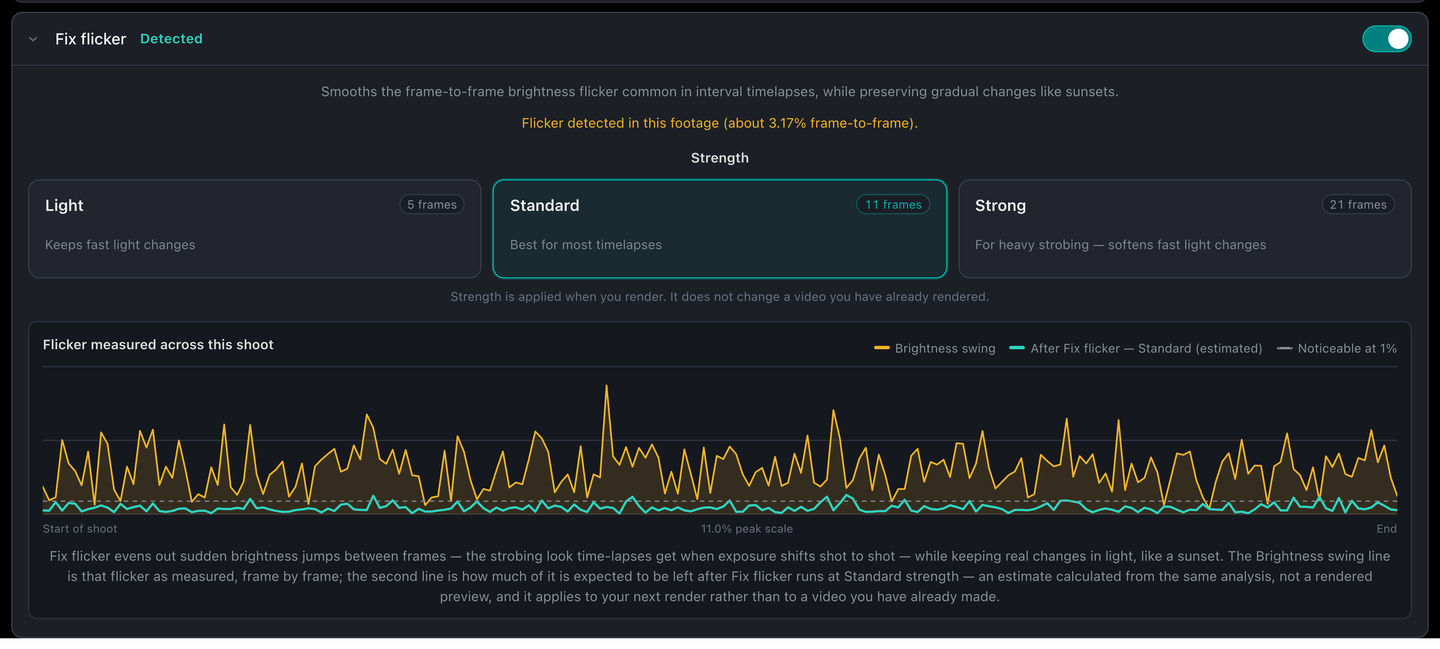
Amber is the flicker Tweedia measured in this shoot — 3.17% frame to frame, where 1% is already visible. Teal is its estimate of what is left after the fix.
Organized by capture day
Drop months of frames in at once. Every photo lands on the day it was actually shot — read from the file, not the filename.
A 90-day build stays reviewable one day at a time instead of becoming an undifferentiated pile. Open a day to see just that day's frames. The days the camera never ran simply are not there.
Sorted on upload, automatically
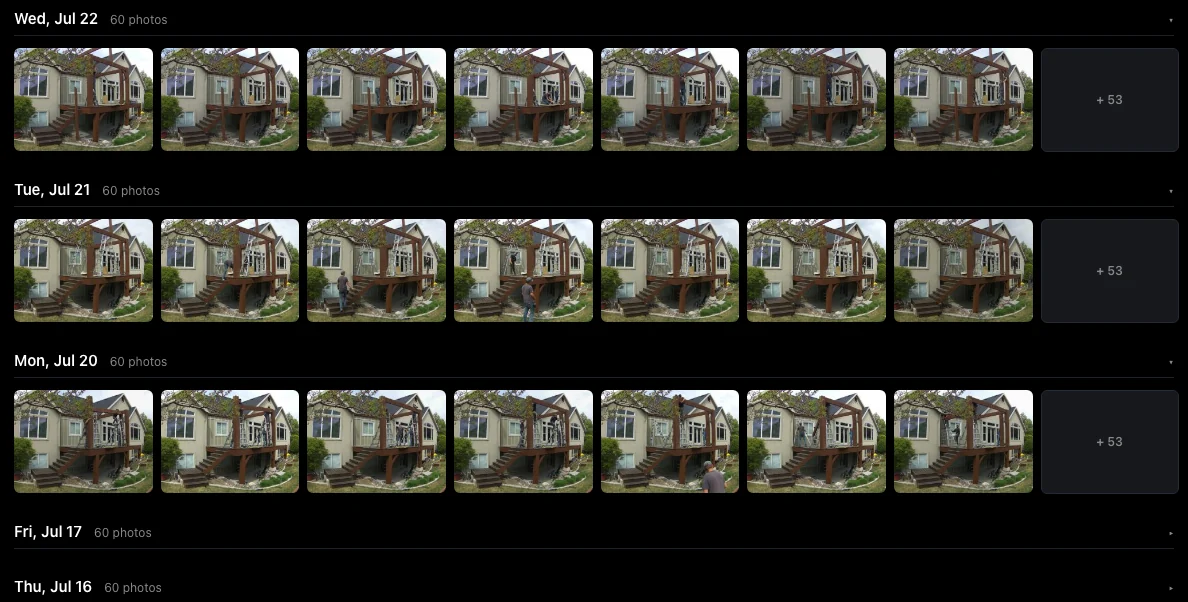
This project: 839 photos across 14 capture days, filed without touching a single filename. Each day shows its own frames and count.
Bring any camera
GoPro, phone, DSLR, jobsite cam, or a Raspberry Pi on a fence post. Photos or video, both work — nothing to install and no camera subscription to buy.
Compile without an editor
Turn an image sequence into a finished timelapse in the cloud. Choose the frame rate; Tweedia builds the file and hands it back.
Storage that keeps the shoot alive
Pooled cloud storage across every project, so a six-month build is not stranded on one SD card. 2 GB free, 50 GB on Solo. On Free, raw photos are cleared 30 days after a project's last activity.
Make it yours
Your brand on every video
Free renders carry a small Tweedia mark. Solo and Pro replace it with your own logo — or switch marking off entirely.
Upload a logo once, wear it everywhere
Drop in your logo — PNG, JPEG, WebP or GIF — and every video you render carries it. Pick the corner, size it against the frame, and set how strongly it shows — the live preview redraws on a real frame of your own footage as you drag.
Your choices become the default for every new project, so the next render already looks like you. Delivering to a client instead? Switch the mark off for a clean cut.
Included with Solo and Pro — set once, on every render
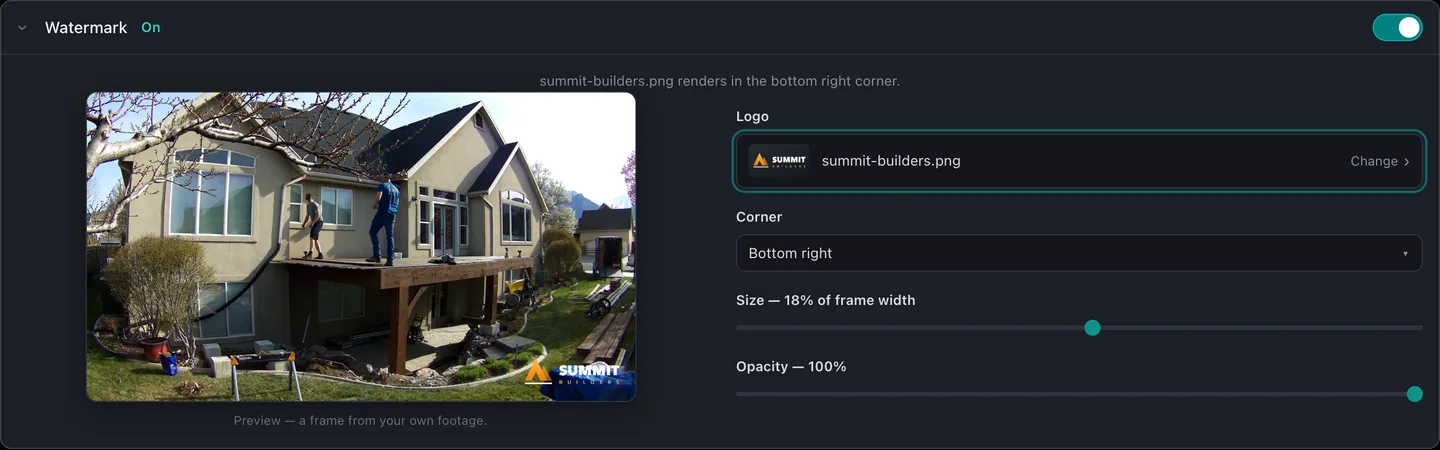
The real settings card: a builder's logo over their own deck build — bottom right, 18% of frame width, full opacity.
See it end to end
The whole thing, in 53 seconds
The problem, the fix, and what it looks like inside the studio.
Plans & pricing
Start free. Upgrade when the shoot gets long.
Pooled storage across every project, monthly render credits, and watermark-free exports. Founding rates stay locked while you stay subscribed.
Free
$0forever
- 2 GB pooled storage
- 10 starter credits
- Renders carry a Tweedia watermark
- Raw photos cleared 30 days after a project's last activity
Solo
$15/month
- 50 GB pooled storage
- 75 render credits every month
- Watermark-free exports
- Raw photos kept while you are subscribed
Pro
$39/month
- 250 GB pooled storage
- 250 render credits every month
- Watermark-free exports
- Raw photos kept while you are subscribed
Credits pay for rendering — longer footage and higher source resolutions use more. Top-up packs are available any time on a paid plan.
Before you sign up
The questions everyone asks first
Do I need a special camera?
No. If it produces photos or video with timestamps, Tweedia can use it — GoPro, phone, DSLR, jobsite cam, or a Raspberry Pi on a fence post. There is nothing to install and no camera subscription to buy.
What if I disagree with the automatic edit?
Then change it. Every step is a switch you can turn off, and the ones that shape the cut — how much movement counts, how short a clip can be, how hard to smooth the flicker — are yours to set, with the result on screen before you render.
What does a render cost?
Credits, priced by how much footage you feed in rather than which features you switch on. Tuning and previewing are always free.
What happens to my raw photos?
They stay in cloud storage while you are subscribed, so the shoot is not stranded on one SD card. On the free plan they are cleared 30 days after a project's last activity.
Ready to edit smarter?
Sign up free, drop in your first batch of photos or footage, and watch the stillness disappear.
No credit card required.